
Badminton tournament software for clubs.
Run your badminton tournament from entries to medals, with the court schedule built for you.
Your first tournament is free, with up to 100 players. Prices in Canadian dollars.
What badminton organizers need
Four things that decide whether the day runs smoothly.
Draws for every event
Round robin, pools into knockout, single or double elimination, Swiss and an optional bronze match. Singles, doubles and mixed, by age and sex.
Scheduling with rest rules
Matches are placed on courts automatically around match length, day hours and rest. Players are not booked back to back.
Live scores
Call matches to free courts and enter scores at the desk. Families follow on a live page or QR poster.
Results and medals
Standings update as scores come in. Medal winners are worked out for you. Results are ready for every event.
Badminton tournament software built for the way clubs run the day
MedalDesk is badminton tournament software for clubs, schools and district organizers. You set up your events, take entries, build the draws, and let the scheduler place every match on a court with rest built in. On the day, the Draw Desk shows every court at a glance, and families follow live scores on their phones.
It is made for the tournaments Canadian clubs actually run: junior singles and doubles days across the U11 to U19 age groups, open events for adults, and school or district competitions where a few courts have to serve a long list of matches. It runs in any browser, so there is nothing to install on the laptop at the desk.
Draws for every badminton event
A badminton tournament is rarely one event. A typical junior day has boys and girls singles, boys and girls doubles and mixed doubles, in several age groups. MedalDesk lets you add them in bulk and set up each one with the draw that fits:
- Round robin, where everyone plays everyone.
- Pools into knockout, where the top players from each pool go through to a playoff.
- Single elimination and double elimination brackets.
- Swiss, for a day where everyone should get several matches.
- Swiss stage into playoffs, where players keep playing others with the same record until they reach the wins to advance or the losses to be out, and the ones who advance play a knockout.
- An optional bronze medal match. Without one, both semifinal losers receive bronze.
In doubles and mixed, a pair is one entry. A player who has no partner can ask to be matched, and you pair up the players who are looking in the same event. Age and sex rules are checked as people enter: a girls event stays girls only, and playing up into an older age group is allowed only if you allow it.
Entries come in two ways. Coaches enter all of their club's players in one form, or players and parents sign themselves up and see what they owe. You can also import a list from Excel.
Court scheduling that gives players rest
The slowest part of a tournament to do by hand is the schedule. MedalDesk builds it from your entries, the number of courts, the length of a match and the hours of the day. Rest is part of the rules: after a match a player is not called again until their rest time has passed (15 minutes by default, and you can change it), so a player entered in singles and doubles is not sent to court back to back.
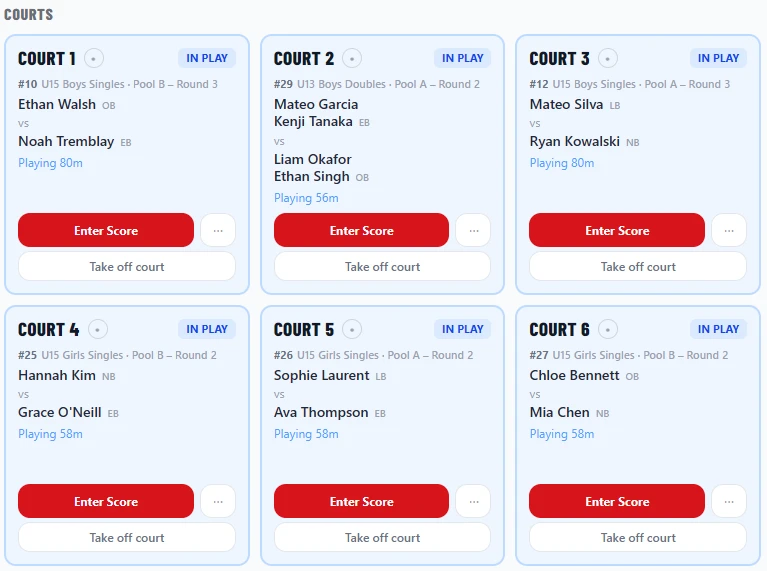
You decide how the day runs. You can choose which events go first, for example doubles in the morning and singles after lunch, or run everything together, and you can drag matches around before you publish. During the day the Draw Desk shows what is on court and what is next, so you can call the next match the moment a court frees up.
Live scores for families and coaches
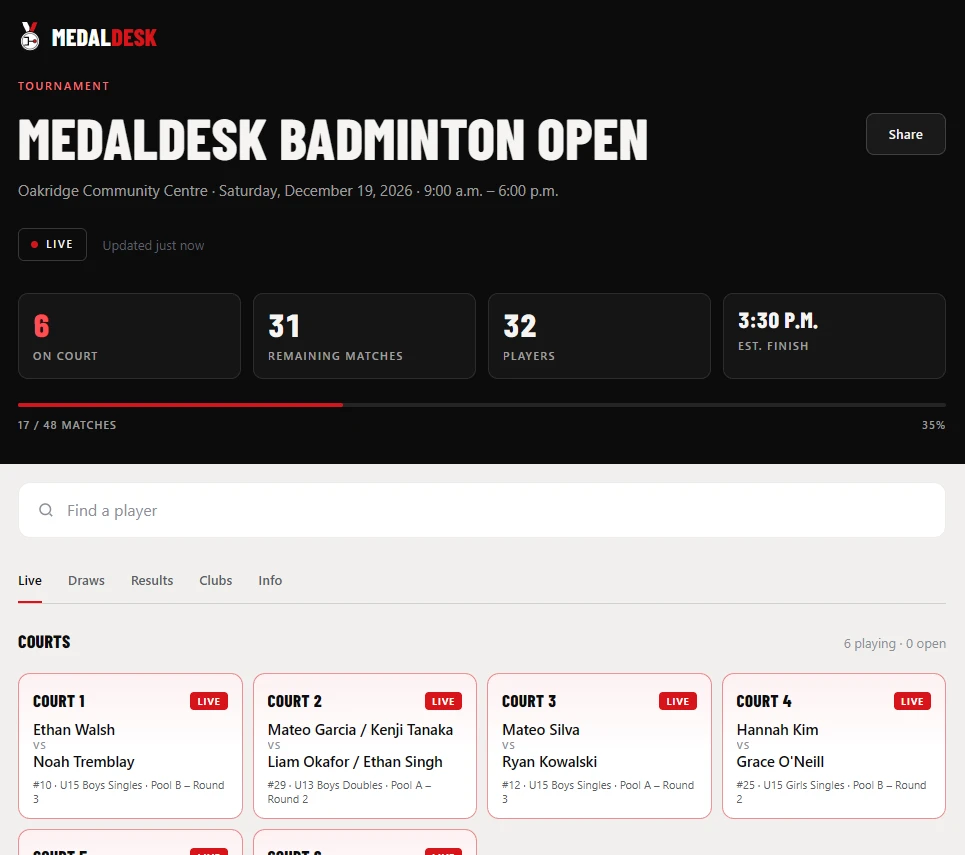
Every tournament gets a live public page that works on a phone, a tablet or the gym TV: courts in play, scores, upcoming matches and draws. Print the QR poster for the wall and parents can follow their child's matches without asking the desk.
At the desk you call a match to a free court and enter the score as each game finishes. MedalDesk checks each score as you type, using badminton's rally scoring: games to 21, win by 2, capped at 30, usually best of three. You can change the points, the best-of and the cap for your tournament. If the wifi drops, desk scores are saved and sent again when it comes back.
Results, standings and medals
Pool standings update as scores come in, ranked by head-to-head, points and games (you can reorder the tiebreakers). When an event finishes, gold, silver and bronze are worked out for you, and the results page shows the podium for every event.
Afterwards you can print the draws, export everything as CSV, and open a report with medal counts by club and your entry fees and expenses, ready to keep for next year.
Collect entry fees online
If you charge entry fees, players, parents, teams or clubs can pay by card when they sign up. Connect your bank account through Stripe, and each card payment goes straight to your own Stripe account and on to your bank. MedalDesk never holds your money and adds no fee of its own. Stripe charges its standard card fee (2.9% + $0.30 per Canadian card), and you choose who pays it. You can also keep e-transfer, or offer both.
Built in Ontario, run anywhere in Canada
MedalDesk is built in Canada by Jack Boos, an Ontario youth badminton coach (Pines Academy). Every feature comes from real problems at the draw desk.
Players, teams and clubs can pay entry fees online by card, straight to your club's bank account through Stripe, or by e-transfer. Prices are in Canadian dollars and the database is hosted in Canada (Montreal). Public pages show only names, clubs or schools, age groups, draws and results, never emails or phone numbers. Your first tournament is free, with up to 100 players. After that, a Tournament Pass is $29 CAD per tournament, or Club Season is $399 CAD per year for unlimited tournaments for one club.
See it running
From a demo tournament. All players and clubs are fictional.
Badminton tournament software: questions
Does MedalDesk support doubles and mixed doubles?
Yes. Singles, doubles and mixed are all supported, by age group and sex. In doubles a pair is one entry, and players without a partner can ask to be matched.
How does MedalDesk handle player rest?
You set a rest time (15 minutes by default) and the scheduler leaves at least that long between a player's matches, including when they play more than one event.
Can parents follow live scores?
Yes. Each tournament has a live public page that works on any phone, and a QR poster you can print so families can find it at the venue. It shows court assignments, scores and draws.
Is badminton tournament software from MedalDesk free?
Your first tournament is free, with up to 100 players. After that, a Tournament Pass is $29 CAD per tournament, or Club Season is $399 CAD per year for unlimited tournaments for one club.
Can I use it for a sanctioned event?
Check your association's rules, since some require specific software. MedalDesk suits club, district and school events.
Where is the data stored?
Our database is hosted in Canada (Montreal). Public pages show only names, clubs or schools, age groups, draws and results, never emails or phone numbers.
Set up your badminton tournament
New to MedalDesk? Read the step-by-step guide, how to set up a tournament in MedalDesk, tab by tab. It works the same for every sport.
MedalDesk also runs pickleball tournament software and volleyball tournament software, with each sport's scoring and divisions built in.
Your first tournament is free. See full pricing for Tournament Pass, Club Season and Associations.
Make your next badminton tournament the easiest one yet.
Free for your first tournament. No install, runs in any browser.